AI Question Creator
Designing a trusted, instructor-centered AI tool to provide fresh and meaningful questions
Summary

Mission
Instructors rely on iClicker to quickly assess student understanding and drive active learning during class. However, creating fresh, effective questions aligned to specific course content can be time-consuming. Reused or easily searchable questions also reduce the quality of assessment and student engagement.
We needed to help instructors rapidly generate original, curriculum-aligned questions they could trust and deploy immediately without sacrificing pedagogical control or assessment integrity.
My contributions
Led discovery, aligned stakeholders on the appropriate method of research, conducted cross-functional collaboration from early concept through execution, and helped shape how AI could responsibly support instructors’ real classroom needs.
Kickoff
Challenges
The challenge wasn’t just to generate questions. It was to do so in a way that felt credible, controllable, and classroom-ready. Instructors faced three core challenges when creating question content:
Time pressures
Creating high-quality, varied questions for polls, quizzes, and assignments required significant time.
Assessment integrity
Common or reused questions were increasingly searchable, making it difficult to gauge true student understanding.
Trust in AI
While instructors were curious about AI, many were skeptical of its accuracy, relevance, and alignment with their teaching style.
Goals & success criteria
I facilitated a collaborative brainstorming session with the product team to identify goals, user stories, questions and expected functionality. We discussed creating questions compatible with various question types, leveraging Macmillan learning content to ensure context was relevant, and identifying how students could derive maximum value from this feature.
Instructor goals
Generate high-quality questions quickly
Maintain pedagogical intent and teaching voice
Feel confident deploying questions live, without heavy editing
Product goals
Reduce question creation timeIncrease usage of in-class assessments
Train the system to consistently generate high-quality content based on user feedback
Build trust and adoption of AI features within iClicker
UX success indicators
Instructors understand how to successfully leverage the question creator and why certain questions were generated
Users have clear paths to edit, refine, regenerate, and flag content
Low friction from creation to deployment
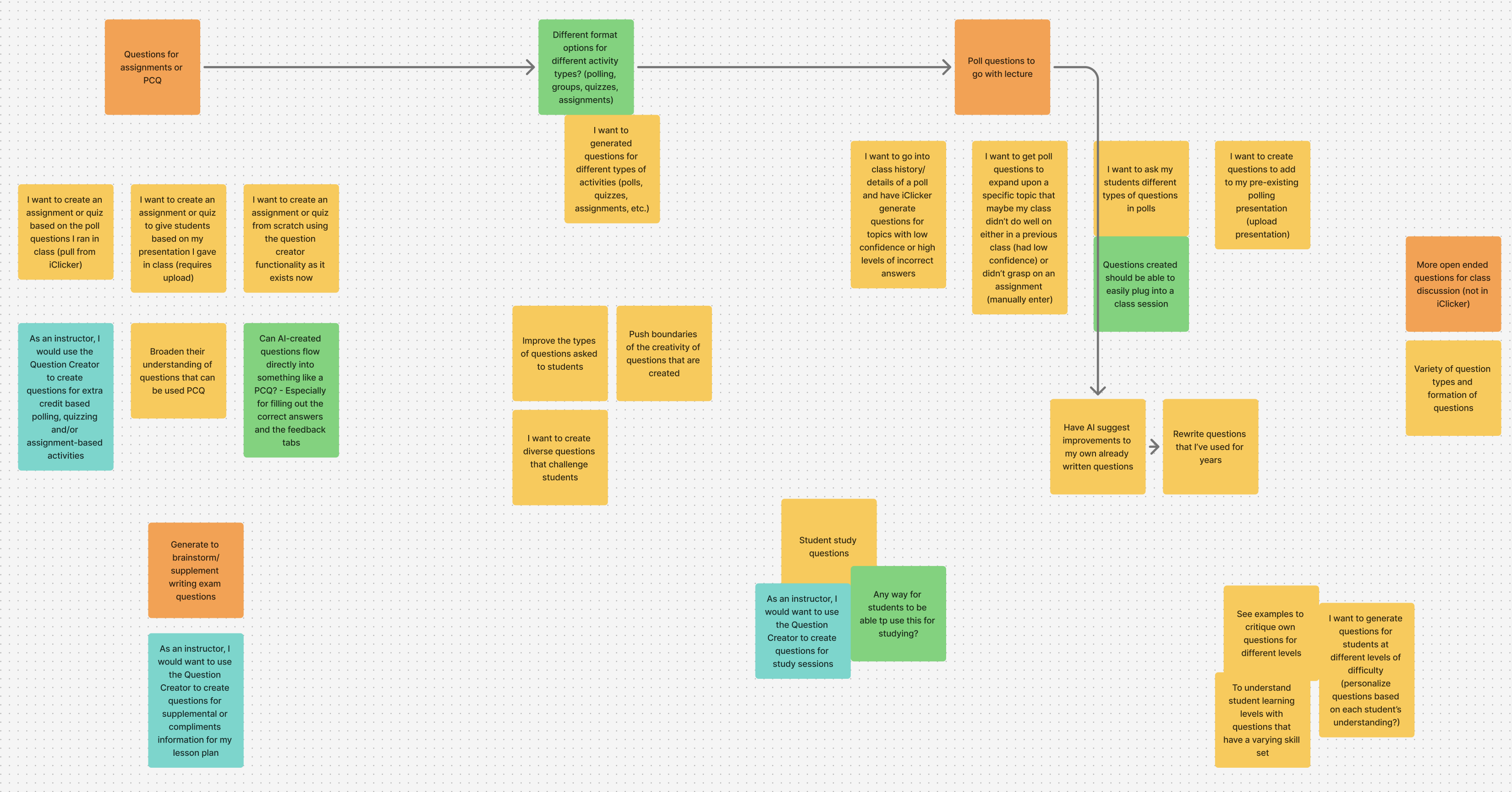
A board with sticky notes highlighting user stories, open questions and expected functionality.
Discovery
Uncovering themes
Through a series of interviews with instructors, feedback analysis, and prior research on assessment workflows, several themes emerged. First, instructors didn’t want “fully automated” teaching. Instead, they wanted creation assistance. Second, their trust hinged on context. AI needed access to course materials, not generic prompts. Finally, flexibility mattered. Different classes required different question types and difficulty levels.
One instructor stated, “I’ve put a significant amount of time into my class material, and a lot of what I’ve created is custom to my class. I don’t want to replace all of my own material.” This insight fundamentally shaped the experience.
Design
Exploration
The first aspect of the feature that needed exploring was whether this feature best suited for the account-level or the course-level. If the question creator lived at the account-level, instructors would have one space to maintain all of their question sets for their classes, but it may not be as contextualized to the course it is used in. Alternatively, if the question creator lived at the course-level, their content would be course-specific, but may limit their ability to reuse content for different class sections.
To ensure we fully assessed our options, I mapped a flow chart for each location. I then met with our product team to assess the flows against our user stories and discuss any opportunities, open questions and considerations. We were able to align on implementing the question creator at the account-level. Not only did this ensure a space to easily create and organize all question sets at once, it created a clear stage for providing instructors with the onboarding needed to successfully use the feature.
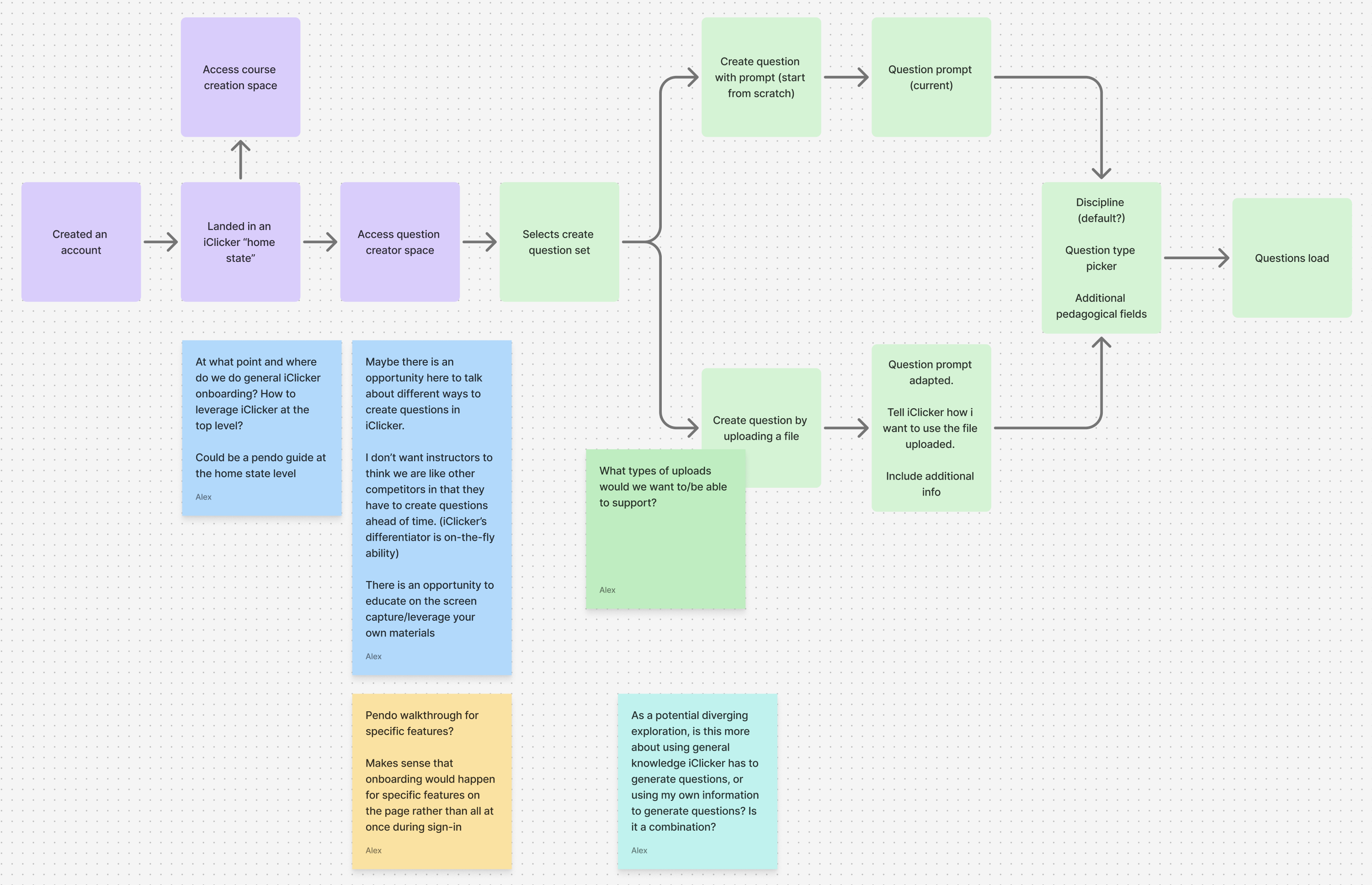
A flow chart mapping the course-level flow with sticky notes depicting open questions and considerations
User interface
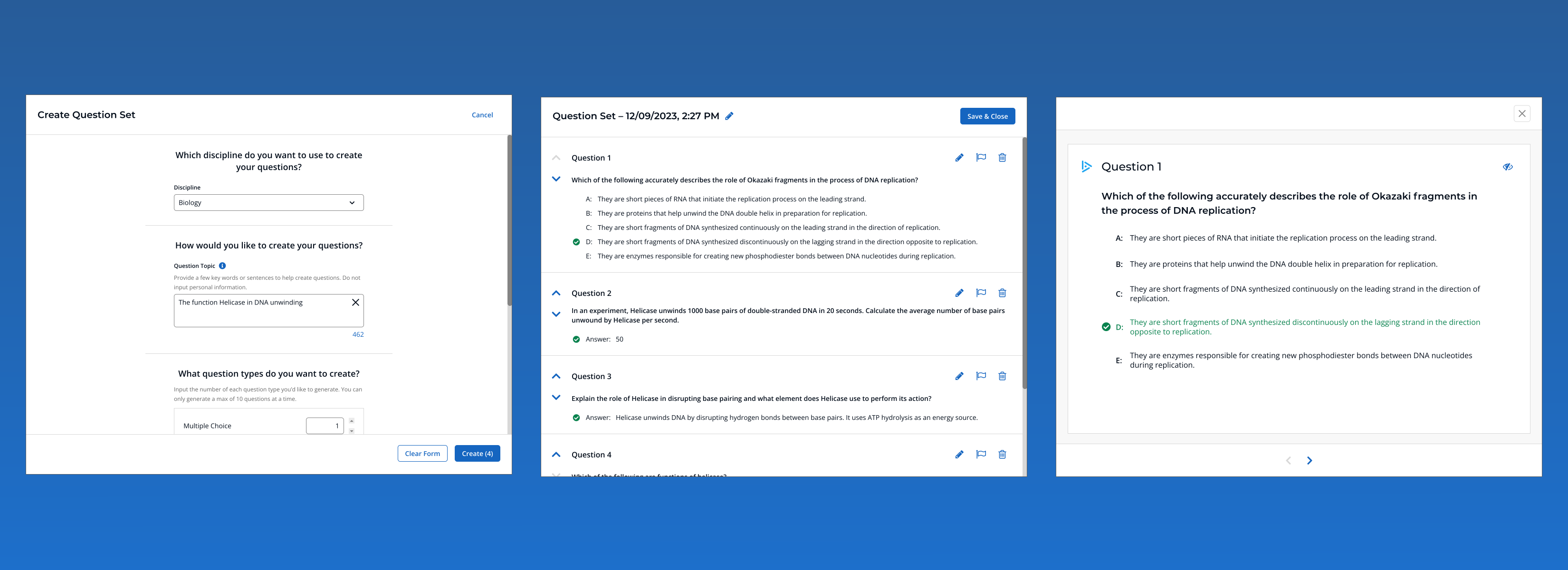
I then ran a collaborative sketching session with our UX team. We discussed a variety of methods through which instructors may wish to generate their questions. Ultimately, we aligned on a form that prompted instructors for base-level details and additional criteria (for power users looking to generate questions using advanced criteria).
Design iteration
After soliciting feedback from team members and proactively communicating with the product team, we were able to align on a beta version of the question creator to validate usage and value with 100 instructors. Results from the beta release were overwhelmingly positive, with numerous instructors stating how much time this would save in their existing workflows.
Outcomes
Key decisions
AI as a co-creator, not a replacement
Rather than positioning the question creator as a tool that would “create assessments for you,” we demonstrated how it could support instructors during content creation. By providing clear controls, allowing for easy regeneration, and incorporating editing and flagging abilities, we helped reinforce instructor ownership of the generation process.
Content-driven generation
To increase relevance and trust, we allowed instructors to upload their own files (slides, notes, readings) as context. This increased confidence that questions were relevant and reflected appropriate pedagogy. We incorporated transparency around how questions were generated, allowed for feedback during generation, and provided sufficient onboarding to prevent overwhelming instructors.
Flexible question types for real classroom use
Instructors use iClicker in varied ways, such as quick pulse checks, deeper discussion prompts, graded quizzes. To allow for easier integration with existing activities, we supported multiple choice, multiple answer, short answer and numeric question types.
Immediate deployability
A critical success factor was allowing instructors to move from generation to classroom use with minimal friction. To address this, we offered compatibility with existing activity types (polls, quizzes and assignments), fast editing and presentation modes for sharing questions live in class. This ensured the feature fit naturally into instructors’ existing habits.
Trade-offs
Balancing power with simplicity
Initially, we set out to allow instructors to generate an unlimited number of questions. However, after discussing constraints with our engineering and marketing teams, we aligned on allowing instructors to generating up to 50 questions. This included multiple choice, short answer, multiple answer and numeric question types.
Designing for trust in AI
One of the most complex challenges was designing for healthy skepticism. We intentionally avoided over-promising AI “intelligence”, used grounded and instructional language, provided control over regeneration and refinement, and designed the UI to encourage review, not blind acceptance. From my perspective, success wasn’t instructors using AI because it existed, but because it earned its place in their workflow.
Impact
While exact metrics varied by rollout phase, the feature significantly reduced time spent creating new questions, increased variety and freshness of in-class assessments, drove strong engagement among instructors already using active learning strategies, and helped position iClicker as a thoughtful, instructor-first adopter of AI. Perhaps most importantly, it demonstrated that AI could augment teaching without undermining instructor expertise.
Reflection
This project reinforced that successful AI products in education are less about model capability and more about human-centered design. Trust, control, and context mattered more than speed alone. By deeply understanding instructor expectations and reservations, we were able to design an experience that felt supportive rather than disruptive, which set a foundation for future AI-powered tools within the platform.

