Accessibility Annotations Library
Establishing a clear annotation system helps increase clarity in design handoffs, and leads to improved accessibility across over ten different product teams
Summary

Mission
While working with numerous different clients, Openfield often aimed to right-size design documentation for each client and project. However, this process increased delivery time and lead to vastly different levels of design documentation. Additionally, accessibility seemed to be consistly deprioritized.
My contributions
I established a clear system for writing design specifications and annotating designs with accessibility considerations. This system created consistency for design documentation across numerous project teams, ensured accessible designs, decreased the number of follow-up questions from the development teams and provided a clear system that new employees could easily leverage.
Kickoff
Project kickoff
In order to understand what problems needed to be addressed across our numerous project teams, I facilitated a brainstorming session with the UX designers from each product team. Together, we discussed what challenges they were facing, the fidelity of specifications they were generally writing, and opportunities to right-size the documentation system.
Identifying pain points
Documention discrepencies
The content that each team was documenting, as well as how it was prioritized, varied vastly for each product team. Some teams leveraged digital sticky notes, while others used robust prototypes. While each was right-sized for the project, the content of the documentation was rarely consistent.
Lack of accessibility knowledge
While every member of the team wanted to ensure final designs were as accessible as they could be, not everyone knew how to annotate designs to ensure things were properly marked.
Need for flexibility
Each product team delivered design documentation for projects at different levels of fidelity. We would need to establish a clear system for robust and simplified documentation.
Outcomes
Deliverables
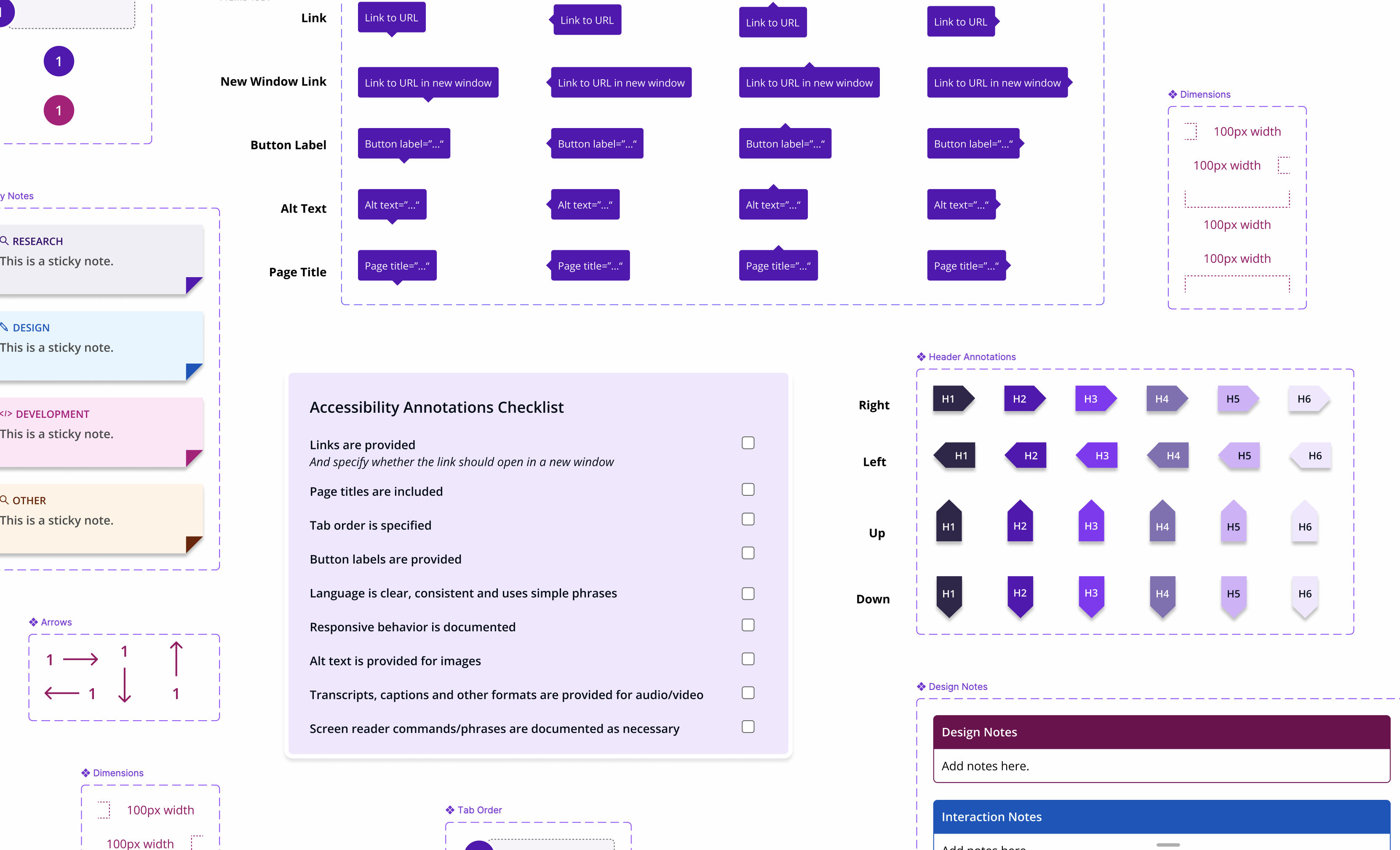
After compiling the findings from our team brainstorm, conducting benchmarking on various documentation styles, and researching the most successful methods of anootating designs for accessibility criteria, I built a Figma library that could be easily leveraged across all of our product teams.
Design specification library
I built a Figma library that could be easily leveraged across all of our product teams and included usage instructions.
Accessibility checklist
In order to ensure that every handoff included the same accessibility considerations, I created an accessibility annotation checklist that could be easily pulled into any page and ensured team members felt confident completing accessibility documentation independently.
Accessibility annotation components
I provided components to quickly mark up pages with accessibility considerations, such as tab order, headings, alt text and links.
To properly introduce the team to the new system, I ran a demonstration to walk through the system, and shared an example of finalized specifications. The reaction to the new system was overwhelmingly positive, and many team members felt empowered to write accessibility documentation on their own.
Reflection
If I were to revisit this today, I may add some supporting documentation to help newer team members understand some basic accessibility standards. However, after leveraging this system for over two years, it has proved to be very successful, and had an undeniably positive impact on numerous product teams.

